SAFETY PERCEPTION UPGRADE

Macro Background

In the Latin America region, DiDi International introduced a new PIN code feature.

Purpose

By passively enabling the PIN code at the platform level, guide passengers to actively enable the PIN code for each subsequent trip. This is intended to increase the PIN code activation rate and improve users’ perception of safety during the trip.

Current Situation

Research shows that the PIN code boarding feature can effectively improve the safety perception between drivers and passengers. However, the current triggering of the PIN code mainly relies on drivers or passengers enabling it proactively, and the range of strong triggering scenarios is relatively small, resulting in weak user awareness. Therefore, for certain specific scenarios and user groups, a mandatory PIN code activation strategy is expected to increase the PIN code activation rate.

User Pain Points

Users may have already actively turned off the PIN code, but the platform still forces the PIN code to be enabled to ensure safety, which affects user privacy. When users request a ride in risky scenarios, they may feel a lack of safety. Some users want to use the PIN code to ensure safety, but they cannot find where to enable it.

Design Goals

Platform level: Improve passengers’ sense of safety.
User level: Allow passengers to enable the PIN code through a faster path.
Product level: Increase the PIN code activation rate.
Design Solution

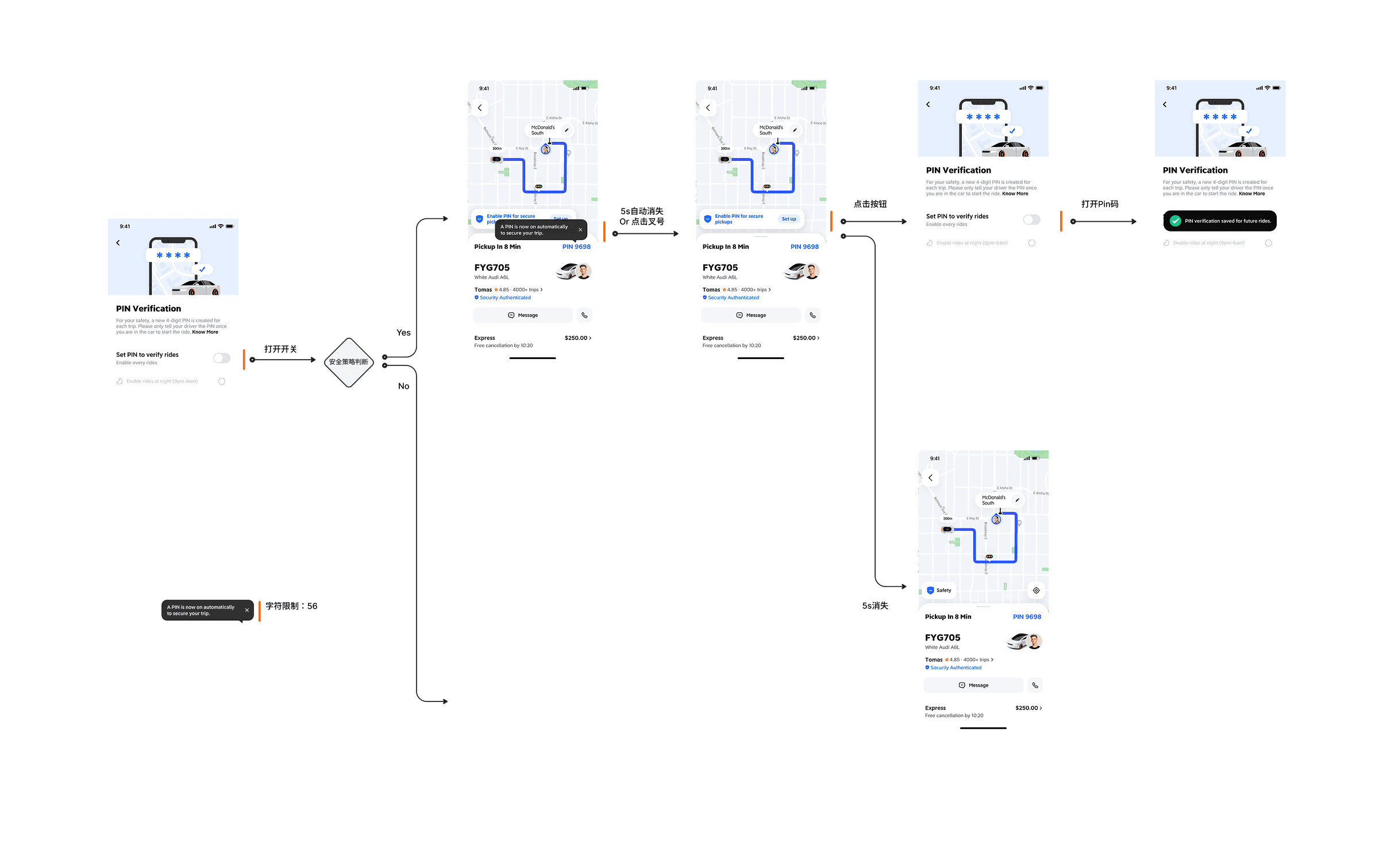
  1. When the user has not enabled the PIN code and a safety perception strategy is triggered, in order to protect user privacy, a blocking pop-up is added to allow the user to choose whether to enable the PIN code in dangerous areas. At the same time, in the Safety Settings Center, two options are added: Enable PIN code in all regions and Enable PIN code in dangerous areas, where the two have an inclusive relationship.

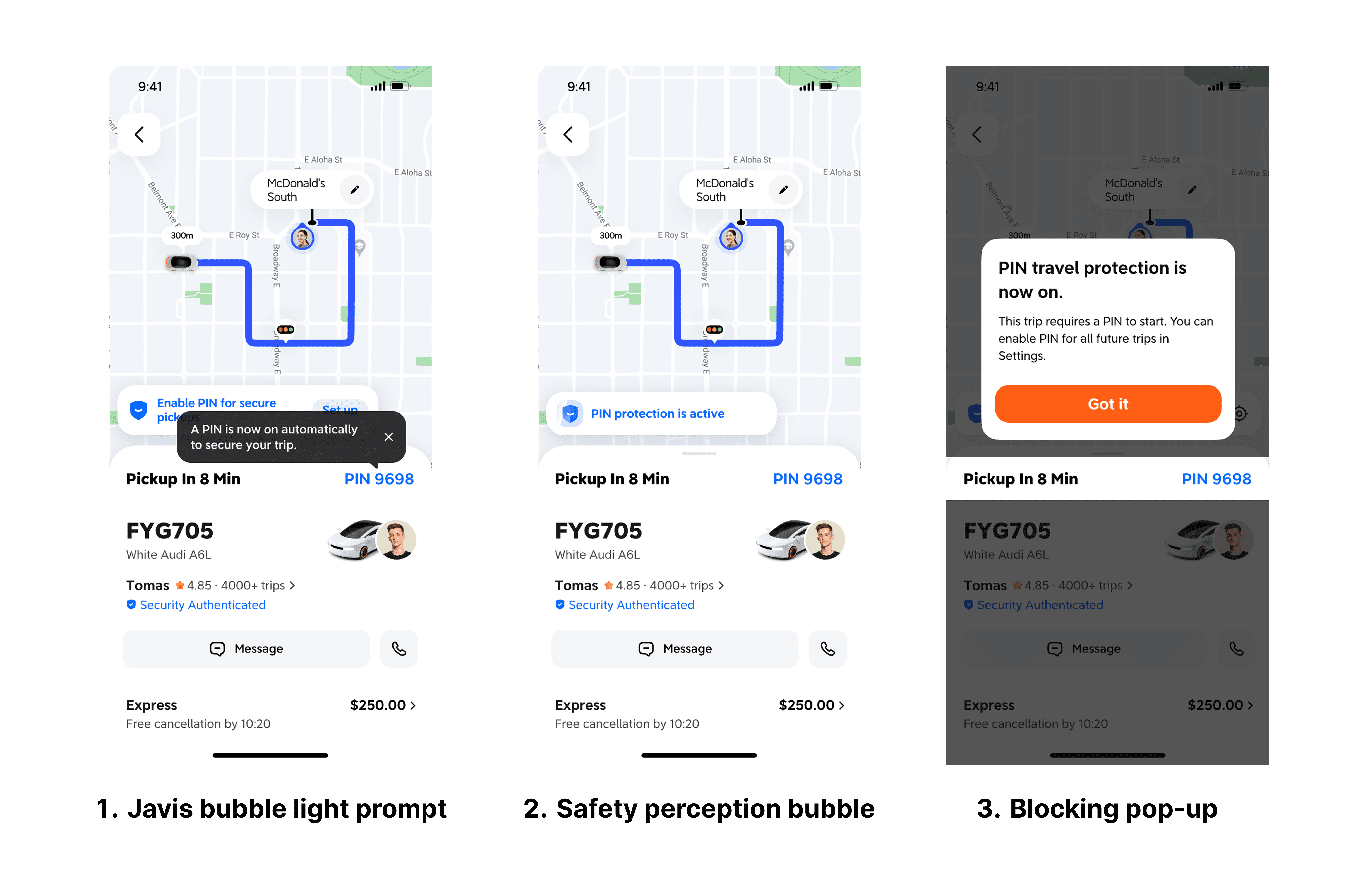
  1. When the user chooses to enable the PIN code in dangerous areas, a PIN code guidance is added to inform the user that the PIN code has been enabled. There are three solutions in total:

    1. Javis bubble light prompt

    2. Safety perception bubble

    3. Blocking pop-up

Finally, options 1 and 2 were chosen. The reason is that the Javis bubble does not affect the current ride request main flow, and using the existing safety perception bubble maintains a consistent user mental model. The blocking pop-up is too heavy and also makes it difficult to iterate different strategies in the same scenario in the future.

  1. When the user clicks the PIN code, a safety bubble with a “Set PIN Code” button is added to jump to quick PIN code settings. Compared with the old process—entering the Safety Center from the safety bubble, then navigating to other settings to enable the PIN code—the new process is faster. At the same time, the “Set PIN Code” button originally located on the PIN code introduction page is removed, because the page had a low opening rate and too many PIN code setting paths caused confusion.

3.Final Option

Post-Launch Key Performance Indicators

Regional Rollout: Successfully deployed across MX, CO, AR, and CL. Conversion: Precision targeting in high-risk scenarios drove the PIN adoption rate from 11% to 45%. User Sentiment: Post-launch surveys confirmed a significant uplift in safety perception among both drivers and passengers. Operational Stability: Despite the shift to a mandatory strategy, Customer Support volume (TPO) remained stable with no significant increase, validating a seamless user experience.

what i learn

When Design and Product disagree, utilize A/B testing (data-driven) and edge-case simulations (logic alignment) to bridge the gap, ensuring a balanced synergy between business goals and user experience.

To identify the optimal solution, I evaluate functionality, UX, and scalability. When visions clash, I advocate for rapid feasibility testing (within one week) to validate ideas with data, minimizing the project cycle while maximizing efficiency.

Design Solution

1. When the user has not enabled the PIN code and a safety perception strategy is triggered, in order to protect user privacy, a blocking pop-up is added to allow the user to choose whether to enable the PIN code in dangerous areas. At the same time, in the Safety Settings Center, two options are added: Enable PIN code in all regions and Enable PIN code in dangerous areas, where the two have an inclusive relationship.

2. When the user chooses to enable the PIN code in dangerous areas, a PIN code guidance is added to inform the user that the PIN code has been enabled. There are three solutions in total:

  1. Javis bubble light prompt

  2. Safety perception bubble

  3. Blocking pop-up

Finally, options 1 and 2 were chosen. The reason is that the Javis bubble does not affect the current ride request main flow, and using the existing safety perception bubble maintains a consistent user mental model. The blocking pop-up is too heavy and also makes it difficult to iterate different strategies in the same scenario in the future.

Design Solution

1. When the user has not enabled the PIN code and a safety perception strategy is triggered, in order to protect user privacy, a blocking pop-up is added to allow the user to choose whether to enable the PIN code in dangerous areas. At the same time, in the Safety Settings Center, two options are added: Enable PIN code in all regions and Enable PIN code in dangerous areas, where the two have an inclusive relationship.

3. When the user clicks the PIN code, a safety bubble with a “Set PIN Code” button is added to jump to quick PIN code settings. Compared with the old process—entering the Safety Center from the safety bubble, then navigating to other settings to enable the PIN code—the new process is faster. At the same time, the “Set PIN Code” button originally located on the PIN code introduction page is removed, because the page had a low opening rate and too many PIN code setting paths caused confusion.

2. When the user chooses to enable the PIN code in dangerous areas, a PIN code guidance is added to inform the user that the PIN code has been enabled. There are three solutions in total:

  1. Javis bubble light prompt

  2. Safety perception bubble

  3. Blocking pop-up

Finally, options 1 and 2 were chosen. The reason is that the Javis bubble does not affect the current ride request main flow, and using the existing safety perception bubble maintains a consistent user mental model. The blocking pop-up is too heavy and also makes it difficult to iterate different strategies in the same scenario in the future.

Create a free website with Framer, the website builder loved by startups, designers and agencies.